|

Contact

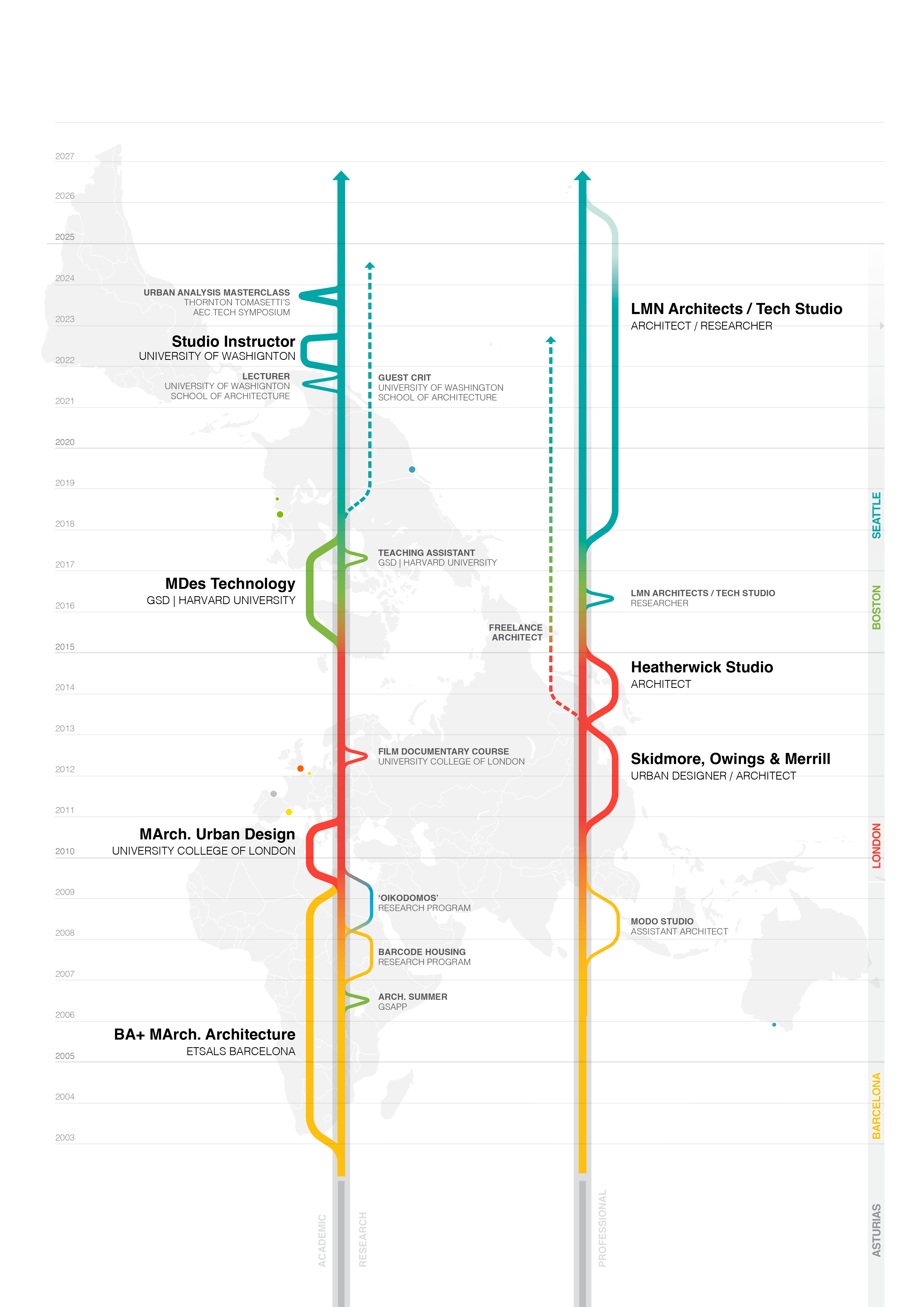
My Trajectory — Timeline

Hi, I'm Enol Vallina,
architect by training, researcher by habit.
I use design to question, reveal, and reshape the systems behind the places we share.

My Design Philosophy

Design

Work Selection

+FUTURES+ARTIFACTS& INTERFACES+ARCHITECTURE+PUBLIC REALM+COMPUTATIONALDESIGN
F
EV-55
F
EV-54
F
EV-12
F
EV-53
F
EV-58
F
EV-48
F
EV-52
F
EV-29
F
EV-49
F
EV-46
A+I
EV-16
A+I
EV-17
A+I
EV-18
A+I
EV-20
A+I
EV-21
A+I
EV-24
A+I
EV-22
A
EV-13
A
EV-10
A
EV-33
A
EV-44
A
EV-34
A
EV-36
A
EV-45
A
EV-09
A
EV-03
PR
EV-14
PR
EV-60
PR
EV-28
PR
EV-26
PR
EV-30
PR
EV-27
PR
EV-15
PR
EV-07
CD
EV-41
CD
EV-32
CD
EV-11
CD
EV-42
CD
EV-06
CD
EV-40
CD
EV-38
CD
EV-39

configure chart or press a preset button to discover projects

Algorithm Explainer

This algorithm selects and ranks projects based on how well they match the radar chart's category values. It translates a visual shape into a curated list of relevant work — the more a project's strengths align with the radar's emphasis, the higher it scores.

Categories
FFutures
A+IArtifacts & Interfaces
AArchitecture
PRPublic Realm
CDComputational Design

Each project has a score (0–100) in every category, reflecting how strongly it relates to that discipline.

Presets

Presets are curated radar configurations — pre-tuned combinations of category values that represent a thematic lens for viewing the work.

OverviewEven distribution — balanced cross-sectionResearchEmphasizes computational + experimental workSpatial Exp.Emphasizes public realm + architectureSystemsEmphasizes computational + futures thinking

Projects can be tagged with a preset name in the data. Tagged projects are boosted to the top of results when that preset is active.

Presets can also define a max projects override, replacing the dynamic calculation with a fixed number.

Step 1 — Radar input

The 5 radar values define the search criteria. Higher = stronger preference.

F 0A+I 0A 0PR 0CD 0
Step 2 — Max projects

How many projects to show. Scales with radar signal strength, unless a preset overrides it.

avg signal0 / 100
dynamic range1015
dynamic result10
preset overridenone
final max10
Step 3 — Dominance detection

Categories at ≥80% get a bonus multiplier (×2). If exactly one is at 100% and all others <30%, it becomes "single dominant" — its projects sort first.

dominant (≥80)none
single dominant?no
bonus multiplier× 2
Step 4 — Scoring each project

Every project is scored by multiplying its category scores against the radar values (a dot product), then adding bonuses.

final = raw score
      + priority × 100
      + dominance bonus
raw = sum of (radar[cat] × project[cat] / 100) for each category
priority = manually assigned importance (0–10) in the data
dom. bonus = radar[cat] × 2, only if project's primary category is dominant
Step 5 — Filter + sort

Projects below threshold (20) are removed. Sorted by:

1st — Preset-tagged projects float to top
2nd — If single dominant exists, its projects sort next
3rd — Highest final score

Then sliced to the max project count from step 2.

Step 6 — Result

The final curated selection is sent to the card carousel.

total scored44
above threshold0
selected0
preset boosted0 of 0

Contact